
AI bookkeeping for U.S. small businesses

Ask your books anything.

Ledger Professional AI reads your ledger, answers in plain English, drafts the entries and guides your month-end close. You approve every line before it touches your books.

Free to download. The everyday books are free. Pro adds the AI, with a 1-month free trial for eligible new subscribers.

iPhone and iPad · iOS 17 or later · English and Spanish

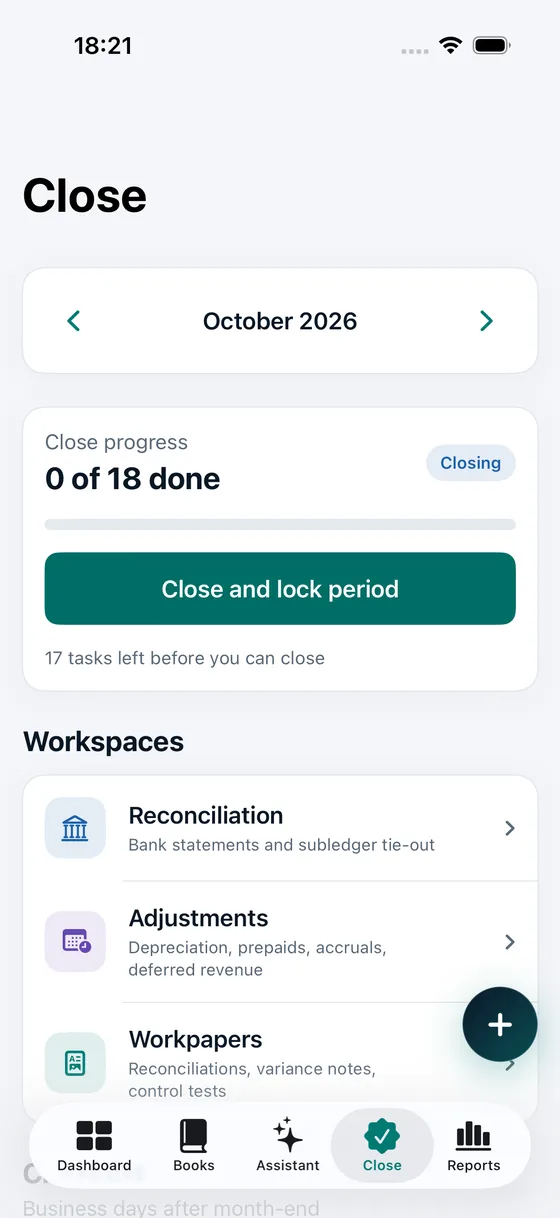
The month-end close screen with the workspaces for reconciliation and adjustments
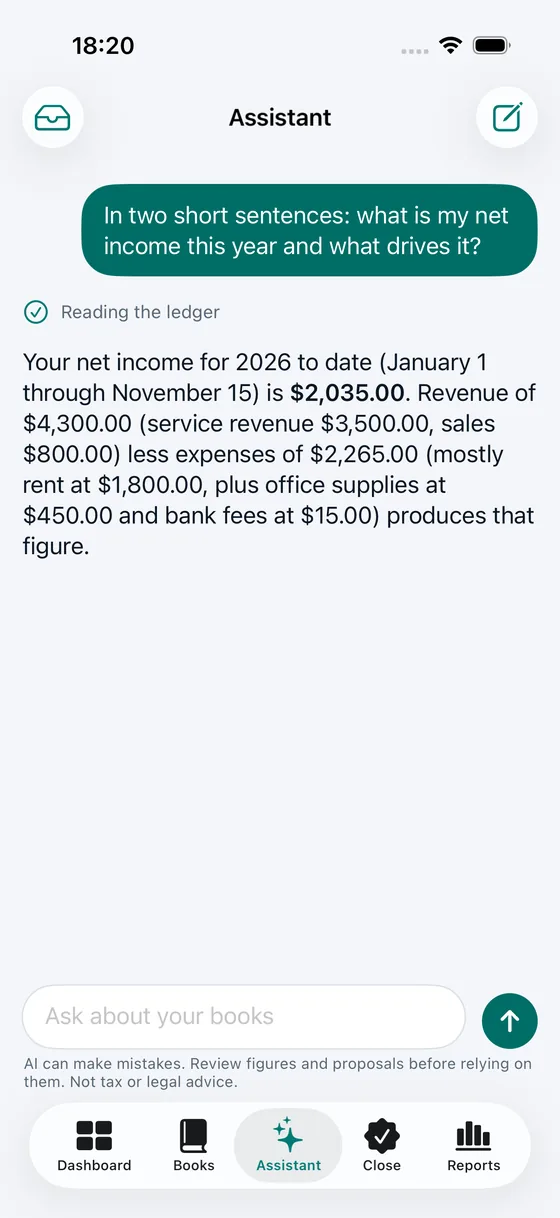
The assistant answering a net income question with revenue and expenses from the ledger
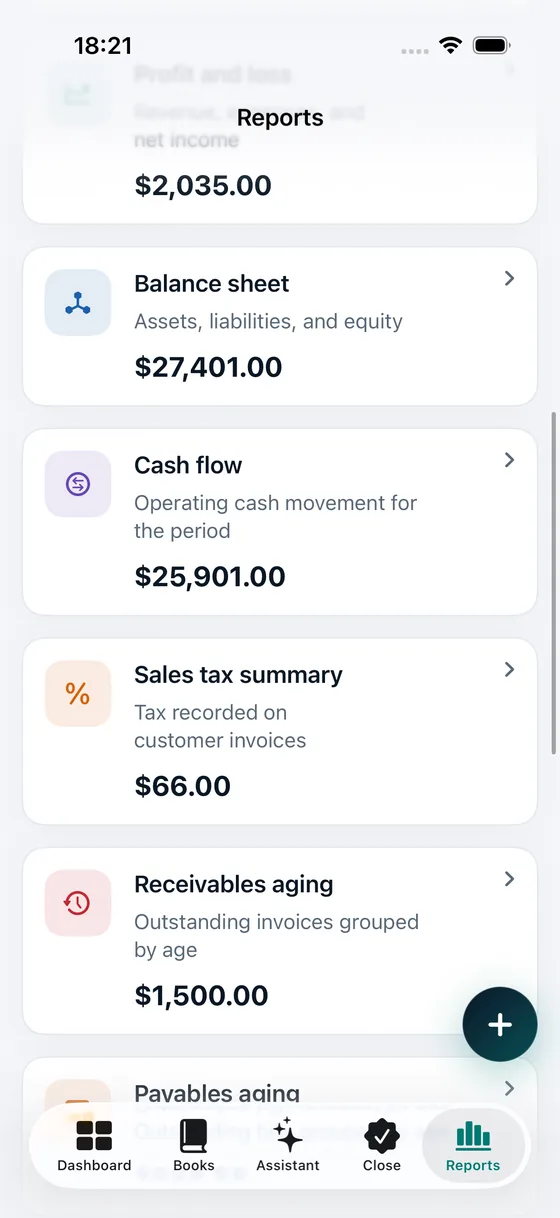
The reports tab listing financial statements and the analysis and readiness tools
  • You approve every entryThe assistant can only propose. Nothing is posted until you tap Approve.
  • Numbers come from codeEvery amount is calculated by the app, never guessed by the AI.
  • Your books stay on your deviceNo account, no cloud copy of your ledger.
  • Works offlineThe AI is optional. Bookkeeping never needs a connection.

Bookkeeping apps give you screens. This one gives you answers.

You started a business to do the work, not to hunt through reports. Ask in your own words and get answers from your actual ledger.

Stop hunting through reports

Ask “why did expenses jump in October?” and get an answer built from your own entries, with the figures behind it.

Stop retyping the same adjustments

Accruals, prepaids, depreciation and reconciling items arrive as ready-to-review proposals with balanced lines and a memo.

Stop dreading month-end

A guided close checklist, bank reconciliation and variance notes, in the order accountants actually do them.

Features

Ask

An assistant that actually reads your books

Not a generic chatbot. It works on your ledger, with tools that return real figures.

  • Answers from your own ledger. Every figure comes from a tool, not from memory.
  • Drafts journal entries, bank matches, reconciling items and workpapers.
  • Understands English and Spanish, and answers in the language you use.
  • Powered by Claude, from Anthropic.
The assistant answering a net income question with revenue and expenses from the ledger

Approve

Proposals, not surprises

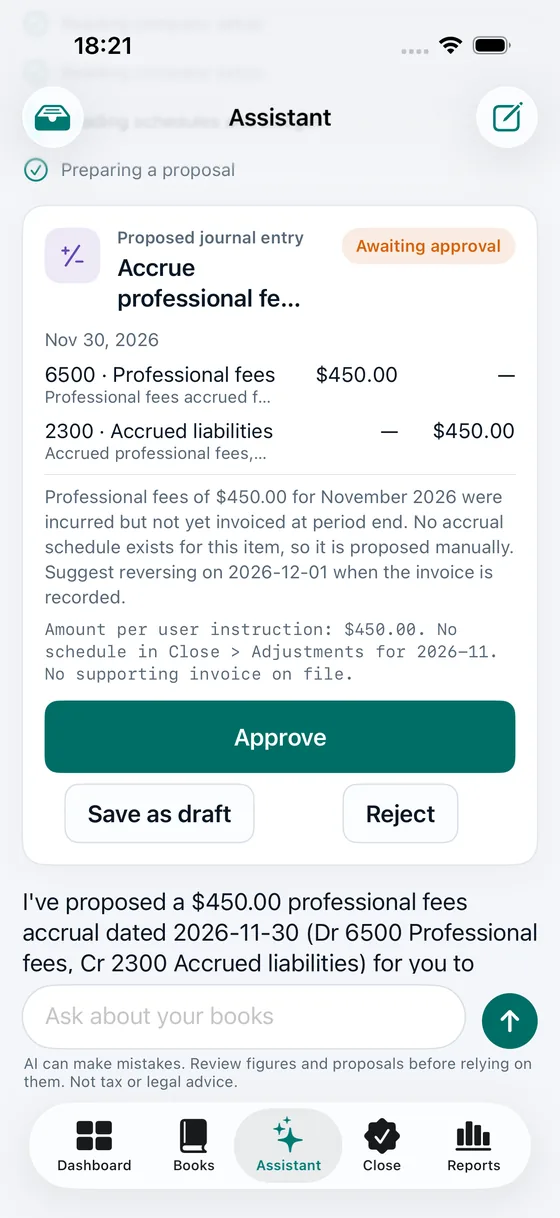
When the assistant prepares an entry, it appears as a card you can read, edit and approve.

  • Balanced lines with account codes, amounts and a rationale.
  • Approve to post, save as a draft, or reject. Your call.
  • A proposal that no longer matches your books is refused as stale.
  • Approvals and rejections are recorded in the audit trail.
A proposed journal entry for professional fees awaiting approval

Close

Close the month in the right order

A checklist built around how accountants work, with the dependencies spelled out.

  • Pre-close, cash, receivables, payables, accruals, fixed assets, revenue, review and reporting.
  • Period lock: a closed month rejects new postings until you reopen it.
  • Depreciation, prepaid, accrual and deferred-revenue schedules that post themselves on approval.
  • Bank reconciliation from the CSV or OFX statement you import. We never ask for your bank password.
The month-end close screen with the workspaces for reconciliation and adjustments

Analyze

See what changed, and be ready when someone asks

Reports for running the business, and worksheets for the people who review it.

  • Profit and loss, balance sheet, cash flow, trial balance, aging and general ledger.
  • Budget versus actual and period-over-period variance, with a net-income bridge.
  • Internal controls with reproducible sampling, test worksheets and a tamper-evident audit trail.
  • Tax-readiness worksheets: 1099-NEC tracking, Schedule C lines and an estimated-tax projection.
The reports tab listing financial statements and the analysis and readiness tools

Try it. The assistant proposes. You decide.

A sample exchange, right here. Nothing on this page touches a real ledger, and in the app nothing is posted until you approve it.

Example
Accrue $450 of professional fees for this month.
Here is the entry I would post. It balances and falls in an open period.
Journal entry · Accrued professional fees
DebitProfessional fees$450.00
CreditAccrued liabilities$450.00
Debits $450.00 = Credits $450.00

Posted to your books. Debits equal credits.

Rejected. Nothing was posted.

Three steps. You stay in control.

  1. Ask

    Type a question or a task in plain language, like “Accrue $450 of professional fees for this month.”

  2. Review

    The assistant reads your ledger with on-device tools and prepares a proposal: accounts, balanced debits and credits, memo and the reason.

  3. Approve

    Tap Approve and the entry is posted through the same validation as a manual entry. Reject it and nothing changes.

Built so the AI can’t do harm to your books

Three rules the assistant cannot break, enforced in code rather than in a prompt.

It can only propose

The assistant has no way to write to your ledger. It creates a proposal. Posting happens only after you approve, through the same checks as a manual entry.

It does no arithmetic

Totals, balances, depreciation and tax worksheets are computed by the app with exact decimal math. The model reads results; it never invents them.

Documents are data, not orders

Text inside a bank statement or receipt is treated as data. If it says “ignore your instructions,” it is just a description.

Your data, plainly

Your books are stored on your device. If you allow the assistant, your question and the excerpts of your books needed to answer it are sent to Anthropic through our server, which does not store or log them. The assistant is off until you allow it, and you can turn it off at any time.

Read the full privacy policy →

The everyday books are free

You can run your bookkeeping without paying a cent. Your data is never locked behind a subscription: exports and backups stay free.

  • Double-entry ledger and chart of accounts
  • Invoices with PDF, payments and receivables
  • Expenses with on-device receipt scanning
  • Contacts, recurring entries and sales-tax rates
  • Profit and loss, balance sheet, cash flow, trial balance, aging
  • General ledger and audit trail
  • CSV and JSON export, backup and restore
  • English and Spanish on iPhone and iPad

Free to start. Pro when you want the AI.

No account to create. Subscriptions are handled by the App Store.

Free

$0

Everyday bookkeeping, forever

  • Double-entry ledger and chart of accounts
  • Invoices with PDF, payments and receivables
  • Expenses with on-device receipt scanning
  • Contacts, recurring entries and sales-tax rates
  • Profit and loss, balance sheet, cash flow, trial balance, aging
  • General ledger and audit trail

Prices shown are U.S. App Store prices and may vary by country. Payment is charged to your Apple Account. Subscriptions renew automatically unless canceled at least 24 hours before the end of the period. Manage or cancel any time in your Apple Account settings.

Made for people who run the business and do their own books

Freelancers and consultants

Invoice clients, track expenses, and see where you stand without opening a spreadsheet.

Studios and service businesses

Keep accruals, prepaids and depreciation tidy, and close each month with a checklist.

Owners who work with a CPA

Export clean records, share workpapers and hand over a reconciliation your accountant can follow.

What it isn’t

  • Not a tax-filing service. It prepares worksheets for you and your tax preparer.
  • Not payroll or inventory software.
  • No bank feeds. You import statements, so we never touch your bank login.
  • Not a CPA, and not a substitute for one.

Questions, answered

Is it really free?

Yes. The everyday bookkeeping is free: ledger, invoices, expenses, core reports, exports and backups. Pro is an optional subscription that adds the AI assistant, month-end close, reconciliation, variance analysis, budgets, internal controls and tax-readiness worksheets.

Can the AI change my books?

No. It can only create proposals. An entry is posted only after you approve it, and it goes through the same validation as an entry you type yourself. You can also reject it or save it as a draft.

Is my financial data sent anywhere?

Your books stay on your device. Only if you allow the assistant, your question and the excerpts it needs (for example account names, balances, entries and contact names) are sent to Anthropic through our server to generate the answer. Our server does not store or log that content. You can turn the assistant off at any time in Settings.

Which AI model does it use?

Claude, from Anthropic. The app tells the model to use tools for every figure, and the arithmetic itself is done by the app.

Can the AI be wrong?

Yes. AI can make mistakes, which is why it proposes instead of posting and why every figure comes from a tool. Review figures and proposals before relying on them. Answers are informational and are not tax, legal or accounting advice.

Does it file my taxes?

No. Tax readiness gives you worksheets for your records and your tax preparer: 1099-NEC tracking, Schedule C line mapping and an estimated-tax projection. Thresholds and rates are editable, sourced and marked unverified until you confirm them.

Do I need an internet connection?

Not for bookkeeping. The ledger, invoices, expenses and reports work offline. The AI assistant needs a connection.

Can I work with my accountant?

Yes. Export CSV or a JSON backup, share invoices as PDF, and hand over reconciliations, workpapers and the audit trail.

Is it available in Spanish?

Yes. The whole app and the assistant work in English and Spanish.

How do I cancel Pro?

Open Settings on your iPhone, tap your name, then Subscriptions, and choose the app. Cancel at least 24 hours before the period ends. Deleting the app does not cancel a subscription.

Which devices does it run on?

iPhone and iPad with iOS 17 or later, in light and dark appearance.

Your books have the answers. Ask them.

Download it free and start with the everyday books. Add Pro when you want the AI.

Download on the App Store